

Best WoW Forever Addons for Leveling, Dungeons, Exploring and Gold
New to addons? Pick what you want to do and start with these four. Add more once you know what you miss.
I want to level up efficiently
- QuestieEvery objective on your map
- What's Training?What to train and when
- Forever Loot SparklesQuest items you cannot miss
- Leatrix PlusFewer clicks at every vendor
I want to run dungeons
- Deadly Boss Mods (DBM)Know what the boss does next
- GTFOA sound when you stand in fire
- Details! Damage MeterSee where your damage goes
- PawnSpot upgrades on the drop
I want to explore Azeroth
- OpenMapOne world map to zoom and drag
- TomTomAn arrow to any coordinates
- HandyNotes: WoW ForeverForever treasures and rares
- AutoBiographerA journal of your journey
I want to earn gold
- GatherMate2Remember every node you find
- Node SightSee which node is which
- AuctionatorKnow the price before you sell
- BaganatorFind any item in one window
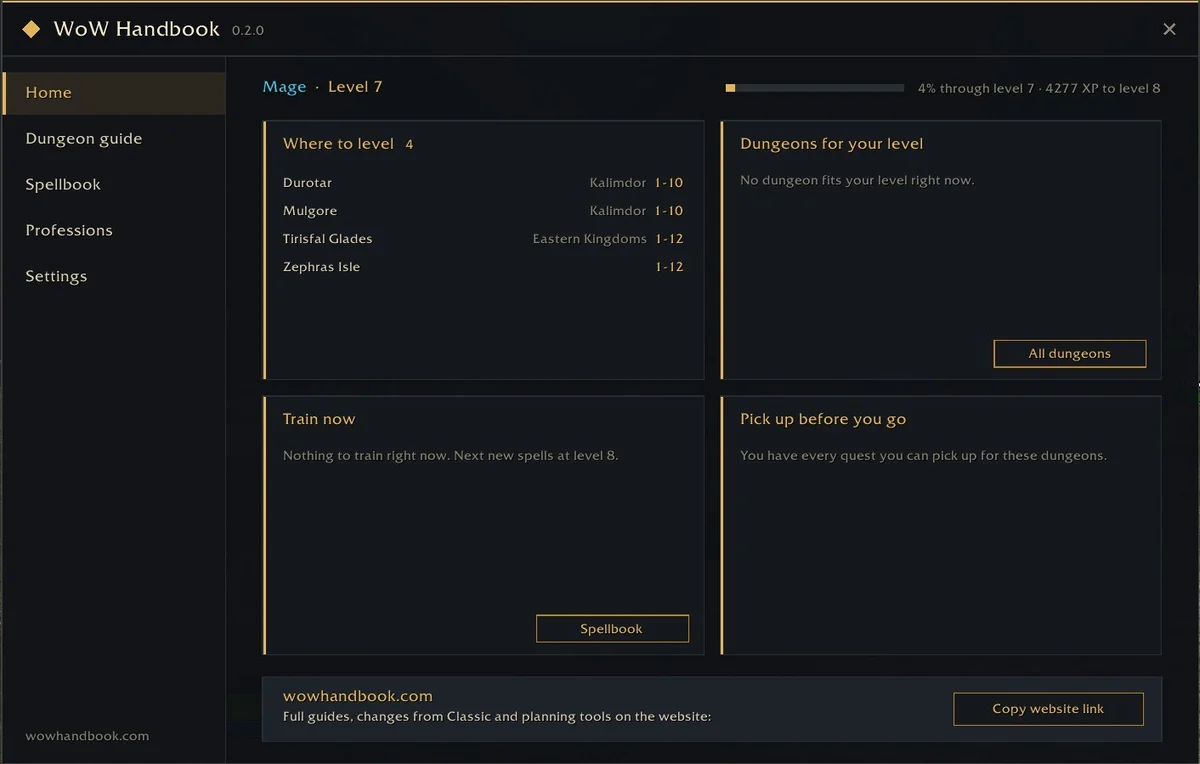
WoW Handbook Addon
Our free addon brings this site into the game: dungeons and quests for your level, spells by level, trainers, herbs and ore on your maps. Open it with /wh.
Best WoW Forever Addons by Category
Every addon below offered a Forever file on its official download page on November 5, 2026, unless it is marked otherwise. Choose that Forever file when you download. Where WoW Handbook covers the same ground, the card says so.

Quests and Leveling Addons
Know where every objective is, which quest comes next and what to train when you get back to town.
Questie
Quest givers, objectives and turn-ins on your map and minimap, with quest progress in the tooltip of every mob and item you need.
Install it from the Questie team's own project page linked here to get their official Forever support.
On WoW HandbookThe WoW Handbook addon lists every dungeon quest with its chain, and can accept and turn in quests for you. Open
Get it on CurseForgeWhat's Training?
Adds the spells your trainers can teach you, now and at later levels, to your spellbook. In Forever it also adds a Professions tab with recipes from trainers, drops and quests.
On WoW HandbookThe WoW Handbook addon shows spells by level with an unlearned-spells panel, and the Spellbook on this site lists every class spell. Open
Get it on CurseForgeRestedXP Guide
A step-by-step leveling route that points you to the next quest, kill or flight.
The addon is free; its full Forever routes are sold separately by RestedXP.
On WoW HandbookOur free leveling guide covers where to quest at every level for both factions. Open
Get it on CurseForgeGuidelime
An in-game leveling guide window with arrows and quest steps; guides come as separate packs.
Get it on CurseForge
Maps and Gathering Addons
A better world map, waypoints, treasures, and herbs and ore you can actually spot.
OpenMap
Made for ForeverJoins the zone maps into one world map you can zoom and drag, in the classic map art, with flight paths, dungeon entrances and boat routes.
On WoW HandbookThe WoW Handbook addon adds flight points, dungeon entrances, zeppelins, boats and zone paths to the standard world map. Open
Get it on CurseForgeTomTom
Type /way with coordinates and an arrow on your screen walks you there.
On WoW HandbookEvery secret and treasure guide on this site has Copy buttons that give you ready-made /way lines for TomTom. Open
Get it on CurseForgeHandyNotes: WoW Forever
Made for ForeverTreasures and rare creatures of Forever marked on the world map.
A plugin for HandyNotes: install HandyNotes too.
Get it on CurseForgeHandyNotes
Your own notes and icons on the world map, and the base that map-note plugins build on.
Get it on CurseForgeGatherMate2
Remembers every herb, ore vein, chest and fishing pool you gather and shows them on your maps.
On WoW HandbookThe WoW Handbook addon shows herb and ore nodes on your maps once you learn the profession, with nodes above your skill tinted red. Open
Get it on CurseForgeNode Sight
Made for ForeverReplaces the plain minimap dots for herbs and ore with each node's own icon, with optional sparkles and an on-screen arrow.
Get it on CurseForgeForever Loot Sparkles
Made for ForeverKeeps the sparkle on lootable quest items even when your graphics settings turn it off, and makes herbs and ore sparkle as you approach.
Each effect can be switched off under Options > AddOns.
Get it on CurseForge
Dungeons and Combat Addons
Boss timers and warnings, a loud alert when you stand in the fire, and a closer look at your damage.
Deadly Boss Mods (DBM)
Timers, warnings and sounds for boss abilities in dungeons and raids.
On WoW HandbookOur dungeon guides cover each boss, its loot and the quests to bring. Open
Get it on CurseForgeBigWigs
A lighter alternative to DBM: boss timers and warnings. Pick one of the two, not both.
Get it on CurseForgeDetails! Damage Meter
Detailed damage, healing and death logs for you and your group.
Forever has its own built-in damage meter, so Details! is optional: add it when you want more breakdowns than the game shows.
Get it on CurseForge
Auras and Cooldowns Addons
Buffs, debuffs and cooldowns as icons and bars you can place anywhere.
WeakAuras
No Forever versionThe best-known aura and cooldown tracker, with thousands of shared setups.
Its official project page offers no Forever file. Musca Auras, ForeverAuras, TellMeWhen and the built-in Cooldown Manager fill the gap.
Official pageMusca Auras
Made for ForeverWeakAuras adapted for Forever so auras keep updating in combat, with a one-click ready-made HUD for each of the nine classes.
Get it on CurseForgeForeverAuras
Made for ForeverA WeakAuras fork for Forever by a different author: custom on-screen graphics for buffs, debuffs and more.
Not made by the WeakAuras team, so setups shared for WeakAuras may need changes.
Get it on CurseForgeTellMeWhen
Cooldown, buff and debuff icons that light up when something is ready or missing.
Get it on CurseForge
Gold and Bags Addons
Price history, faster selling and one tidy bag window.
Auctionator
Simple auction house searches, shopping lists, price history and one-click selling.
On WoW HandbookOur profession guides show what each profession makes and the route to level it. Open
Get it on CurseForgeTradeSkillMaster
A full gold-making toolkit: auction posting rules, crafting costs and sales tracking.
Powerful but takes time to learn. For everyday buying and selling, Auctionator is enough.
Get it on CurseForgeBaganator
One bag window, as a single view or sorted into categories, with your bank and other characters' items searchable.
Get it on CurseForge
Interface and Tools Addons
Everyday quality-of-life options, nameplates, quick-cast rings and a helper for addon errors.
Leatrix Plus
Dozens of small quality-of-life options in one place, each with its own switch.
On WoW HandbookThe WoW Handbook addon also sells grey items, upgrades spell ranks on your action bars and colors out-of-range buttons red. Open
Get it on CurseForgeOPie
Rings of spells, items, mounts and macros that appear while you hold a key; release over one to use it.
Get it on CurseForgePlater Nameplates
Highly customizable enemy nameplates with color, size and cast bar options.
Get it on CurseForgeBugSack
Catches Lua errors quietly and lets you read them later, so you can see which addon is failing.
Needs BugGrabber, which the CurseForge app installs with it.
Get it on CurseForge
Gear and Loot Addons
Loot tables, leveling upgrades and a quick answer to "is this better?"
Forever Leveling BiS
Made for ForeverRanks quest rewards, dungeon drops, crafted items and world drops for each slot by your class, spec and level, against what you wear.
On WoW HandbookOur BiS pages give a gear sheet for every class at every level range, with stat priority and where each item drops. Open
Get it on CurseForgeNeedRoll
Made for ForeverA loot browser for Forever: loot from dungeons, raids, PvP, factions, collections and professions.
On WoW HandbookThe WoW Handbook addon shows boss loot filtered by your class and armor type, and our dungeon guides list every boss drop. Open
Get it on CurseForgeAtlasLoot Classic Forever
Loot tables for every dungeon and raid boss, browsable in game.
Get it on CurseForgePawn
Marks upgrades in item tooltips using stat weights you set for your class.
On WoW HandbookEach BiS page on this site lists the stat priority for that class and spec, ready to copy into your weights. Open
Get it on CurseForge
Story and Journal Addons
Hear the quest text read aloud and keep a record of your character's journey.
AutoBiographer
Records your character's journey in a searchable journal: stats, notes, a replay of your route and your gear history. In Forever it labels items and creatures that are new to Forever in their tooltips.
On WoW HandbookOur changes database lists everything Forever changed from Classic. Open
Get it on CurseForgeSpoken
Reads quest text, NPC dialogue, zone lore and books aloud with AI voiceover.
Voices are not included: install the voice pack for each part you want read.
Get it on CurseForgeDoes WeakAuras Work in WoW Forever?
Not from its official project: on November 5, 2026, the WeakAuras page listed Retail and the Classic clients but no Forever file. These four cover the same job:
| Option | What it is | Best for |
|---|---|---|
| Cooldown Manager | Built into the game; turn it on in the game settings. | Tracking your key cooldowns with nothing to install |
| Musca Auras | WeakAuras adapted for Forever, with a ready-made HUD per class. | A class HUD in one click |
| ForeverAuras | A WeakAuras fork for Forever by a different author. | Building your own auras the WeakAuras way |
| TellMeWhen | Icons that light up when a cooldown is ready or a buff is missing. | Simple icons that are quick to set up |
Strings shared for WeakAuras are not guaranteed to import into these addons; check the addon page before you rebuild a setup.
What WoW Forever Does Without Addons
Forever runs on the modern game client, so some things that needed an addon in Classic are already in the game.
Damage Meter
Read your own output straight away. Add Details! when you want more breakdowns.
Cooldown Manager
Shows your important cooldowns on screen once you turn it on in the game settings.
Same Rules as Modern WoW
Addons can change how your interface looks, but are limited in how much they decide for you in combat.
How to Install WoW Forever Addons
- DownloadInstall with the CurseForge app, or download the Forever zip from the addon's official page.
- UnzipFor a manual install, unzip into
_forever_\Interface\AddOns. - RestartRestart the game and tick the addon on the AddOns list at character select.
Common Questions
Do addons work in WoW Forever?
Yes. Blizzard supports addons in WoW Forever, and many popular addons publish a Forever version: 31 of the 32 addons on this page had a Forever download on November 5, 2026. Forever follows the same addon rules as modern WoW, which limit how much an addon can decide for you in combat.
Does WeakAuras work in WoW Forever?
The official WeakAuras project page did not offer a Forever file on November 5, 2026. Musca Auras and ForeverAuras adapt WeakAuras for Forever, and TellMeWhen and the game's built-in Cooldown Manager cover simpler tracking.
What are the best addons for leveling in WoW Forever?
Questie for quest objectives on your map, What's Training? for the spells to learn at each level, Forever Loot Sparkles to keep quest items visible, and Leatrix Plus for faster vendoring. RestedXP adds a step-by-step route if you want one.
Do I need a damage meter addon in WoW Forever?
Not to start. Forever has a damage meter built in. Details! also has a Forever version if you want more detailed breakdowns.
Where do WoW Forever addons go?
Into the Interface\AddOns folder inside the _forever_ folder of your World of Warcraft installation. The install guide covers the CurseForge app, manual installs and what to do when an addon does not show up.
Are Classic Era addons the same as Forever addons?
Not always. Forever runs on the modern game client, so an addon needs a file made for Forever. Pick the Forever file on the addon's download page rather than a Classic Era one.