Download
WoW Handbook is a free addon for WoW Forever that answers three questions while you level and run dungeons: where to go, what to learn, and what to do next. Open it in game with /wh.
Get it on CurseForgeDownload zip from GitHub (0.3.0)
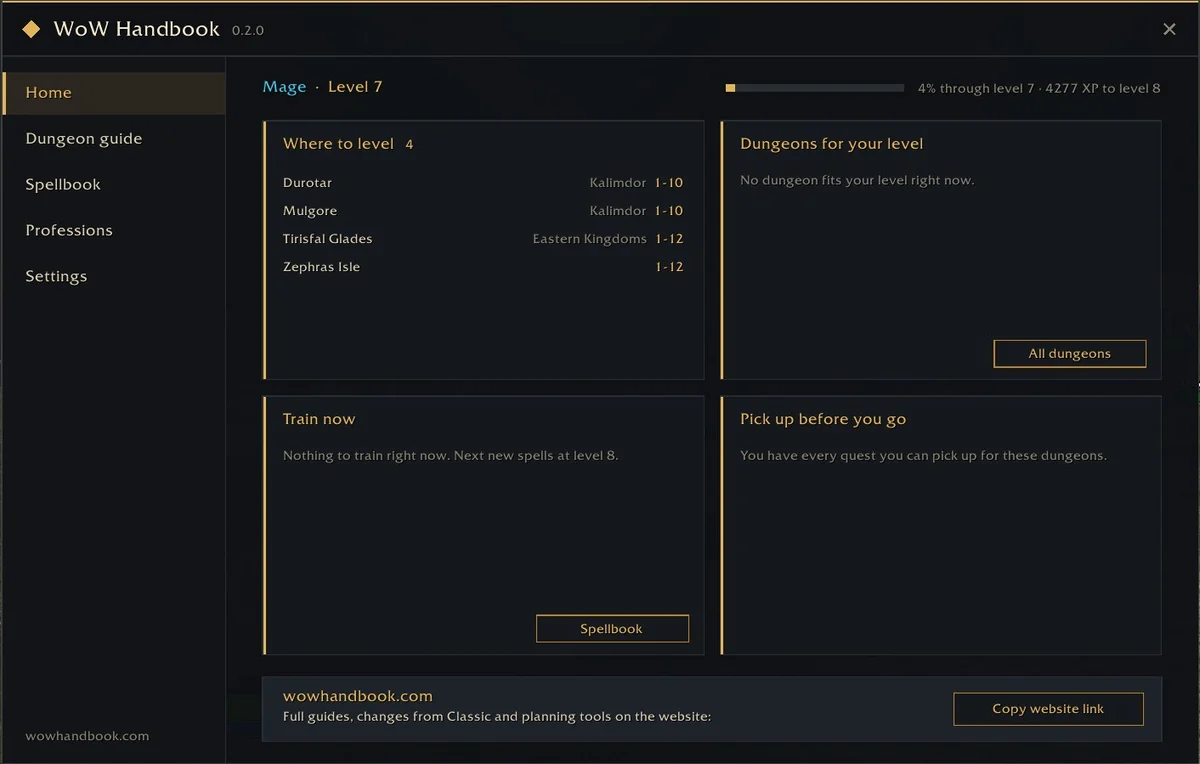
Read the launch story in the announcement article.
What It Does
Dungeon Guide
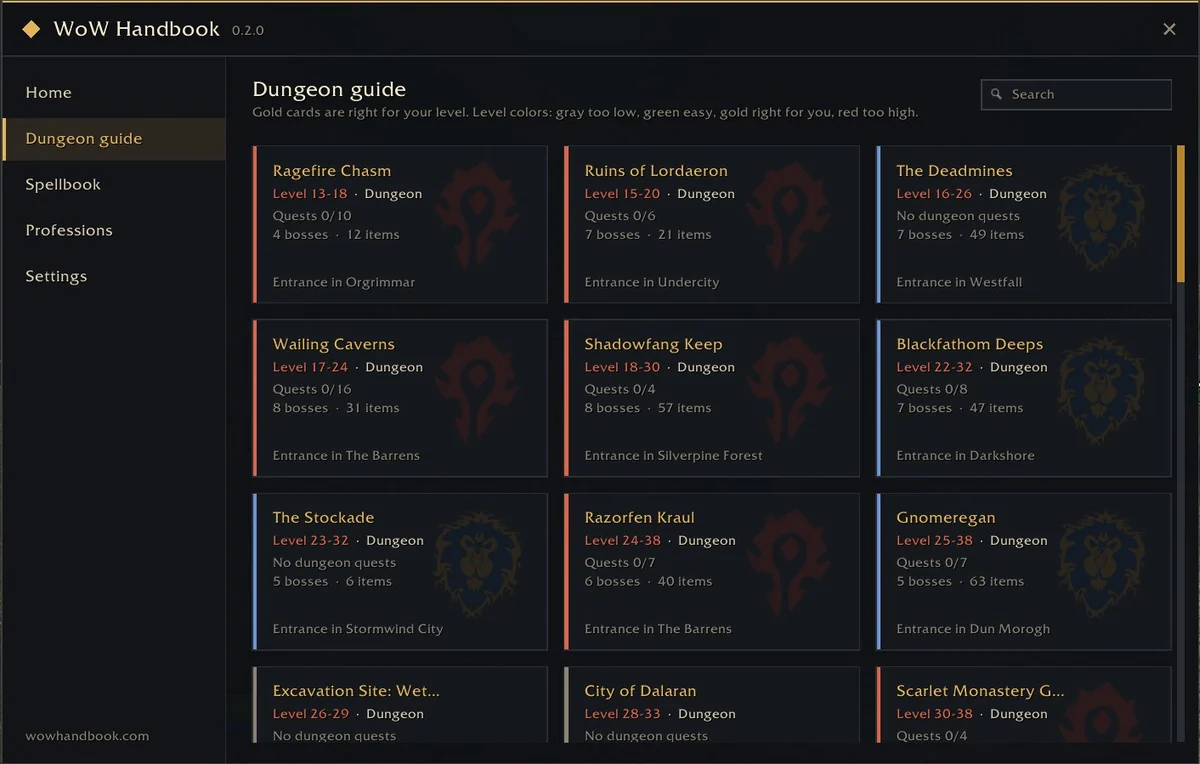
Dungeons matched to your level, the quests to pick up before you go in, the quest chains behind them, and boss loot filtered by your class and armor type. Quest givers and entrances appear as map pins.
Quests and Chains
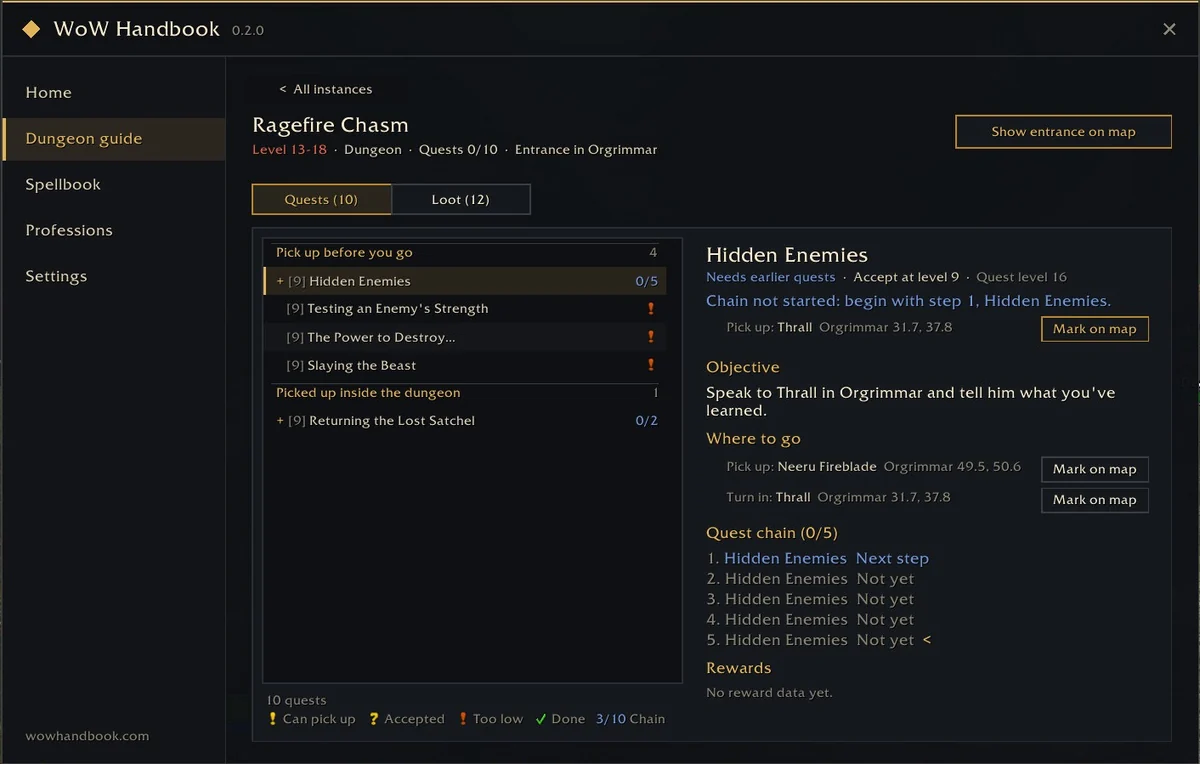
Every dungeon quest lists its objective, where to pick it up and turn it in, and the whole quest chain with your next step, with buttons to mark each NPC on your map.
Talent Simulator
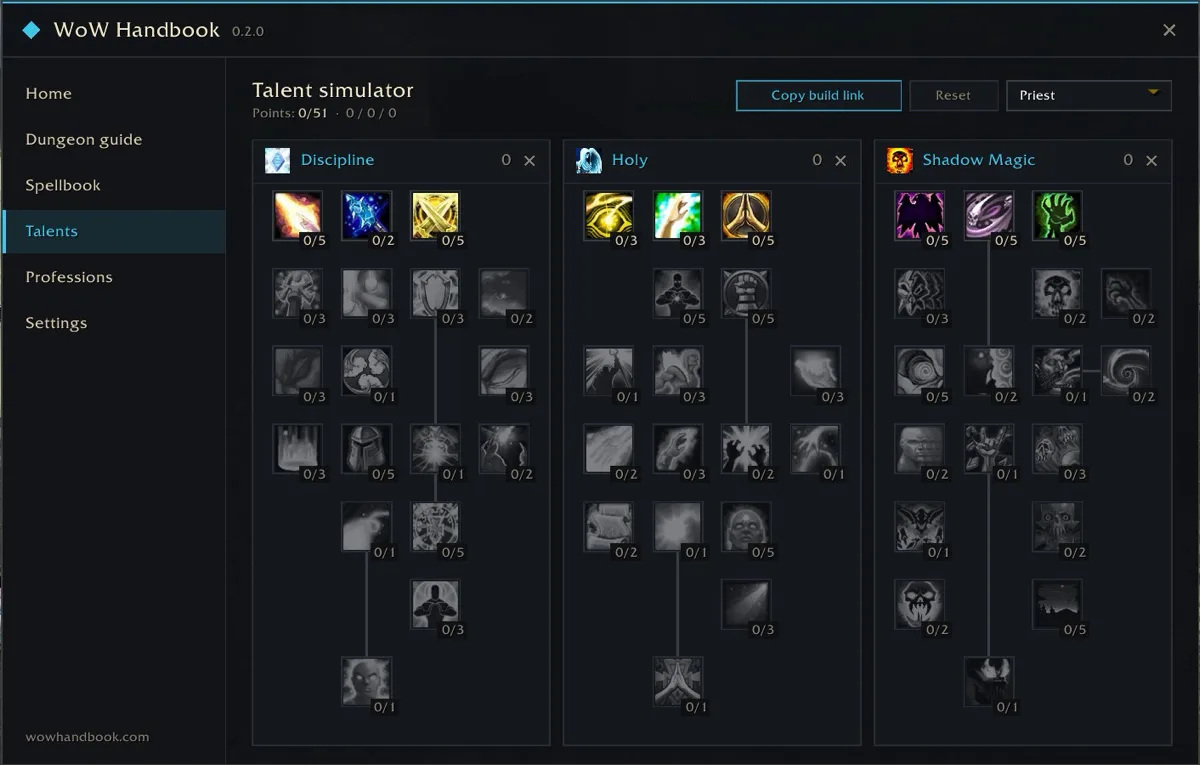
Plan a build for any of the nine classes without leaving the game. Left-click adds a point, right-click removes one, and the game's own rules apply: 51 points, five points per row, prerequisites first. Each class keeps its own build, and one button copies a link that opens the same build in the Talent Calculator on this site.
Spells by Level
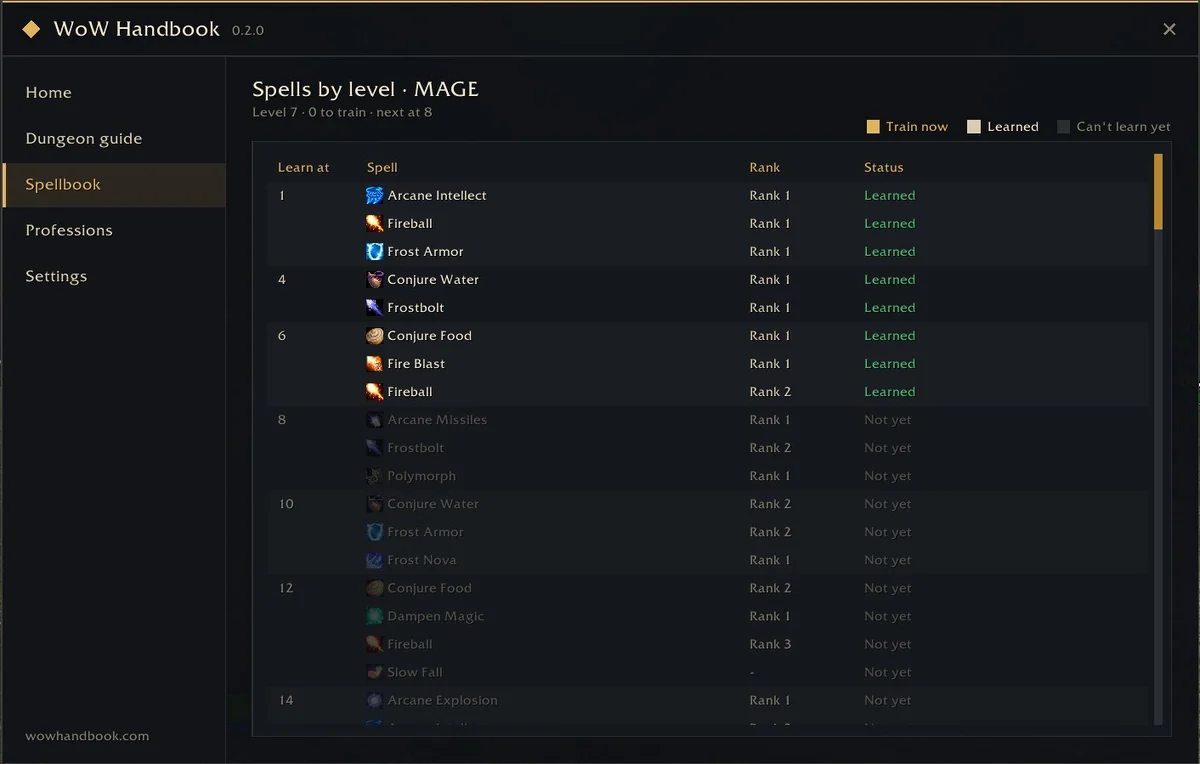
See what your class learns at every level and plan your trainer trips. When new ranks are waiting at your trainer, the addon tells you. It shares its data with the Spellbook on this site.
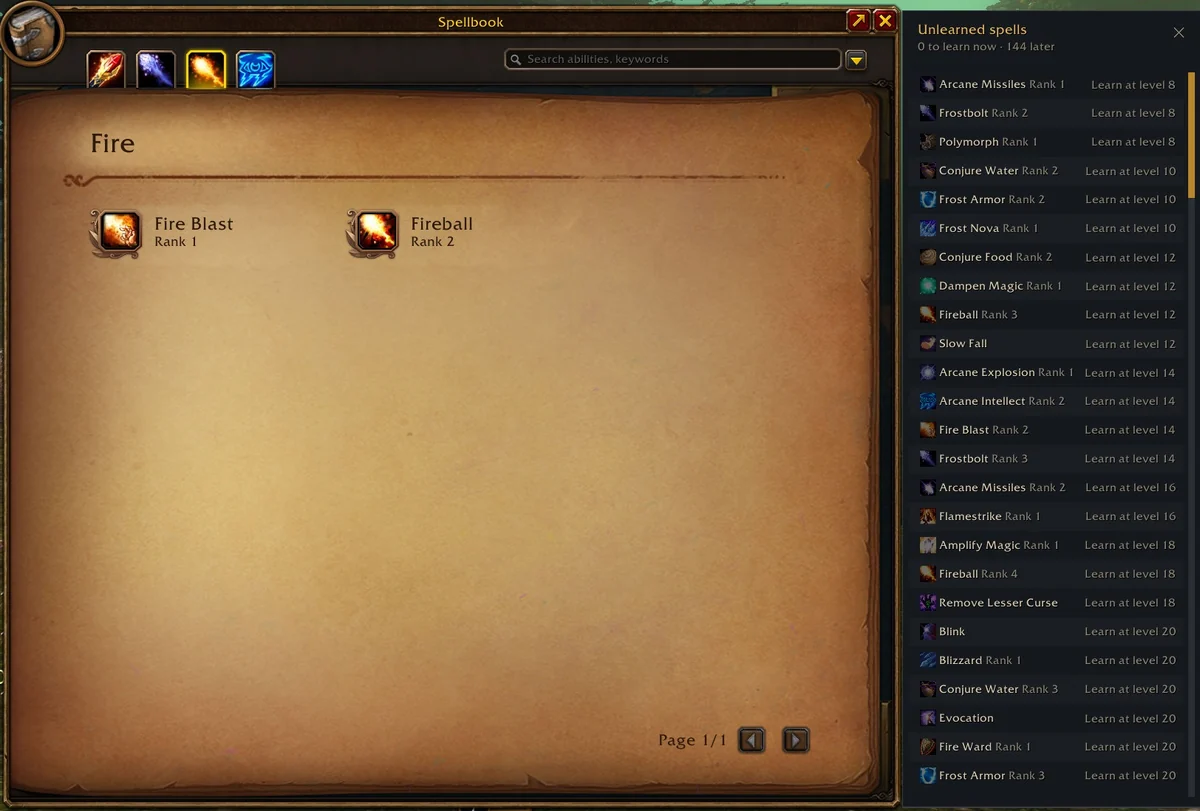
Unlearned Spells Panel
Open the game spellbook and a slim panel next to it lists every spell you have not learned yet, with the level you learn it at. Drag it anywhere and it stays there.
Profession Trainers
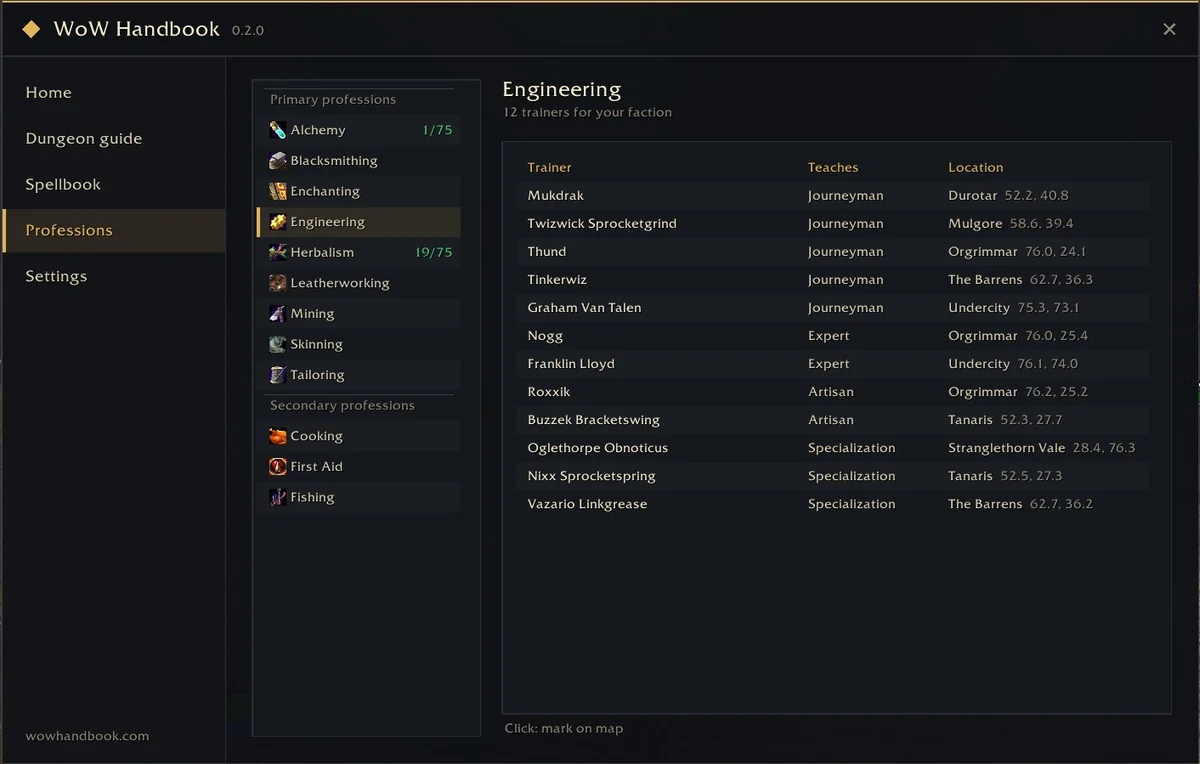
Every trainer for all 12 professions for your faction, with the rank they teach and where they stand. The trainer you need next is highlighted; click one to mark it on your map. Your class trainers and the trainers of your professions also appear on the world map.
Quick Settings
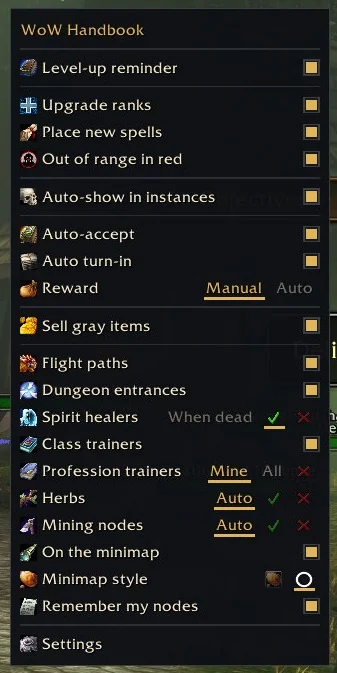
Right-click the minimap button for a compact menu with the options you change most, from auto quest and the reward choice to herb, ore and trainer pins. The full settings page has a switch for every feature.
And More
- Instance Tracker. Inside a dungeon, a slim window shows boss progress and your dungeon quests with the familiar quest marks and counts such as 3/8. Type /wh test to preview it anywhere.
- Herbs and Mining Nodes. Once you learn Herbalism or Mining, nodes appear on the world map and minimap, with the required skill on hover and nodes above your skill tinted red. Spots you gather yourself are remembered.
- Trainers on the Minimap. The class trainers, profession trainers and spirit healers you show on the world map also appear on the minimap as small borderless icons.
- Your Colors and Language. The accent color follows your class, or pick the classic gold or any class color. The main window can turn translucent, and the interface language can follow the game or be set to English or Simplified Chinese.
- Auto Quest. Accept quests and turn in finished ones as soon as you talk to an NPC. Pick rewards yourself or let the addon choose a usable one first. Hold Shift to skip.
- Out of Range in Red. When your target is out of range, the whole action button turns red, not just the small hotkey number.
- Action Bar Upgrades. Higher ranks replace lower ranks on your bars when you train them, and new active spells fill empty slots.
- World Map. Zone level ranges, flight points (colored when unlocked, grey when locked), dungeon entrances, spirit healers, full map display and map scaling.
- Auto-Sell Junk. Grey items are sold automatically when you talk to a vendor.
- Links to the Full Guides. Copy the link to the matching guide, build or tool on wowhandbook.com in one click.
Screenshots taken in game on the English client with versions 0.2.0 and 0.3.0.
Update History
Every published version, newest first.
Version 0.3.0
A talent simulator, class color schemes with a translucent window, trainers and spirit healers on the minimap, race spell tags and an interface language switch.
- New Talent simulator: all nine classes, three trees side by side. Left-click adds a point, right-click removes one, with the game's own rules (51 points, five points per row, prerequisites first). Each class keeps its own build, and one button copies a link that opens the same build in the Talent Calculator on this site. Open it from the Talents page or type /wh talents.
- New Color scheme: the accent color now follows your class. Switch to the classic handbook gold or any class color in Settings; the change applies at once.
- New Background opacity: make the main window translucent, from 100% down to 30%. Text, borders and menus stay solid.
- New Interface language: follow the game, or pick English or Simplified Chinese in Settings.
- New Trainers and spirit healers on the minimap: the class trainers, profession trainers and spirit healers you show on the world map also appear on the minimap as small borderless icons. One switch turns them off.
- New Race-only spells in the spellbook page: every race's spells are listed and tagged with their race, green for yours and grey for the others. The panel next to the game spellbook still lists only your own.
- New Zephras Isle, the Skyborne starting zone: class trainers, profession trainers and the spirit healer are on the map.
- Improved Settings page: categories on the left, one clear list of options on the right.
- Improved Dungeon guide: redesigned cards with icons and counts, every dungeon of both factions is listed, and quest counts only include the final dungeon quests.
- Improved Auto quest: a quest that cannot be accepted or turned in is not retried in the same conversation; talk to the NPC again and the addon tries once more.
- Improved Trainer and spirit healer positions now use spots measured in game where available.
- Fixed Professions page: opening a profession whose trainers have no rank (such as Mining) no longer raises an error, and trainer rank names match the titles shown in game.
- Fixed Priest spellbook: Lightwell, which trainers no longer teach, is removed.
Version 0.2.0
Trainers and gathering nodes on your maps, automatic quest accept and turn-in, red out-of-range buttons, a slimmer instance tracker and a quick settings menu.
- New Professions page: every trainer for all 12 professions for your faction, with the rank they teach and where they stand. The trainer you need next is highlighted; click one to mark it on the map.
- New Trainers on the world map: your class trainers, with how many spells you can train right now, and the trainers of the professions you know.
- New Herb and mining nodes on the world map and minimap once you learn Herbalism or Mining. Each spot shows the main node of the zone and lists every possible node with its required skill; nodes above your skill are tinted red. The minimap can show item icons or small circles, and spots you gather yourself are remembered (nodes that only drop quest items are skipped).
- New Auto quest: accept quests and turn in finished ones when you talk to an NPC. With several rewards, choose yourself or let the addon pick a usable reward first, then the most valuable. Hold Shift to skip; a quest that fails is not retried.
- New Out of range in red: when your target is out of range, the whole action button turns red instead of just the small hotkey number. Switch it off in Settings or the quick menu.
- New Right-click the minimap button for a compact quick settings menu.
- Improved Slimmer instance tracker: boss progress sits in the title bar, killed bosses fold into one line, and quests use the familiar quest marks (? ready, ! pick up here) with counts such as 3/8. Collapsed, it still shows the next boss. Type /wh test to preview it anywhere.
- Improved Settings use icons and short names, with the full description on hover. The unlearned spells panel moves clear of the spellbook tabs and can be dragged anywhere.
- Fixed Dungeon boss counts no longer include loot-only entries, and Deadmines bosses follow the order you meet them.
Version 0.1.0
First public release for the WoW Forever client.
- New Dungeon guide: dungeons matched to your level, the quests to pick up before you go in, quest chains, and boss loot filtered by class and armor type.
- New Spells by level: every spell your class learns at each level, with an alert when new ranks are waiting at your trainer. Warlocks get demon abilities and grimoires in clear categories.
- New Action bar upgrades: higher ranks replace lower ranks on your bars when you train them, and new active spells drop into empty slots.
- New World map: zone level ranges, flight points (colored when unlocked, grey when locked), dungeon entrances, spirit healers, full map display, and map scaling.
- New Map pins for quest givers and dungeon entrances, plus one-click links to the matching guides on wowhandbook.com.
- New Automatic sale of grey junk items at vendors. Every feature can be switched on or off in the settings.
Install
- Open the CurseForge project page and install with the CurseForge app, or download the zip file. The same zip is also on GitHub.
- For a manual install, unzip the WowHandbook folder into the Interface/AddOns folder of your WoW Forever client.
- Start the game (restart it if it was running: new addons load only at startup), make sure WoW Handbook is ticked on the addon list, then type
/wh.
Common Questions
Is the WoW Handbook addon free?
Yes. It is free on CurseForge and every feature is included.
Which game version does it support?
It is built for the WoW Forever client, version 1.60.1. It is not meant for Retail or Classic Era.
How do I open it in game?
Type /wh or /wowhandbook. The same command closes it.
Can I turn features off?
Yes. Every feature has its own switch in the settings, so you keep what you like and leave the rest.
Is it an official Blizzard addon?
No. It is a player-made addon and is not affiliated with or endorsed by Blizzard Entertainment.